Features
What you can do
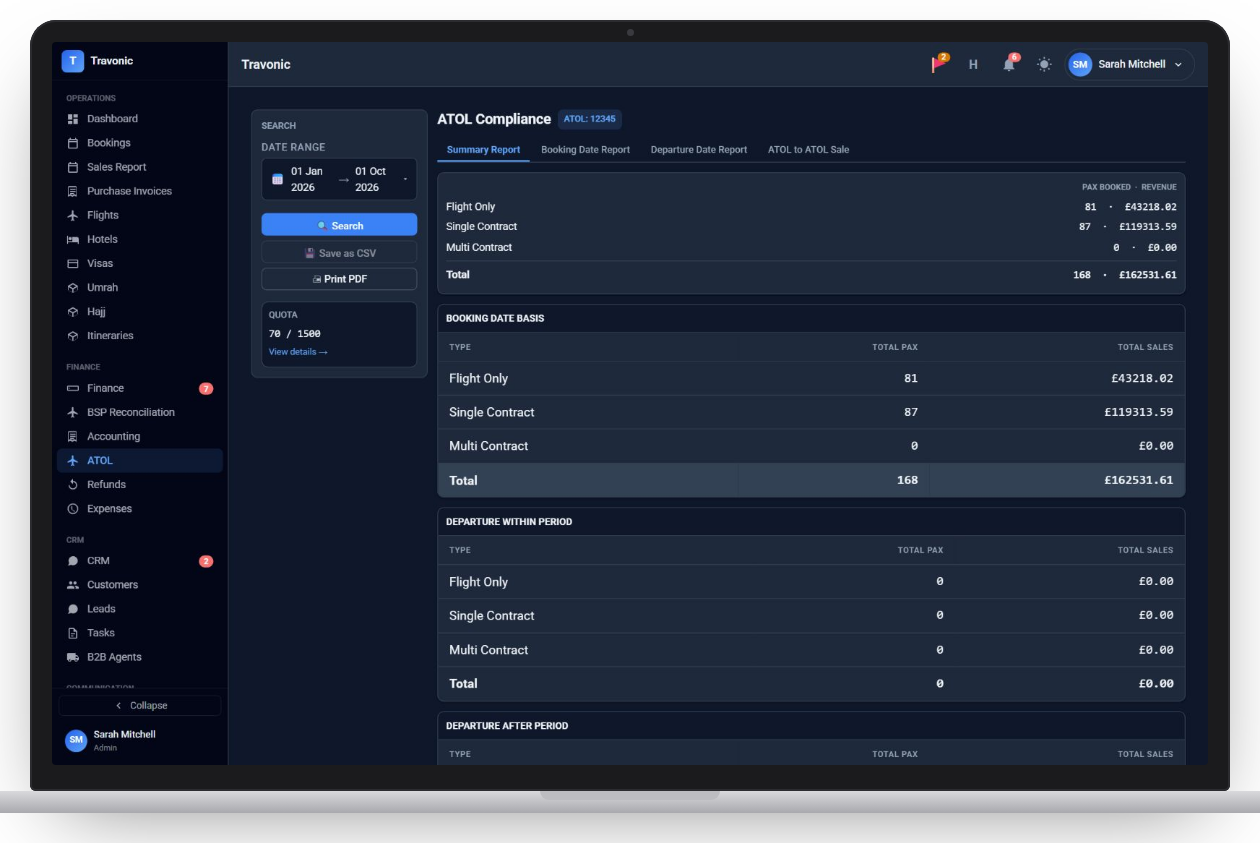
ATOL reports
Flight-only, single-contract and multi-contract passengers and sales by booking date or departure date.
Quota tracking
Passengers booked against the quota on your licence, with warnings as you get close.
Certificates
Issue and print ATOL certificates against each booking.
CAA return
Generate the figures for your CAA return.
ATOL-to-ATOL
Report sales made through another ATOL holder separately.
How it works
ATOL in 4 steps
- Enter your ATOL details in settings
- Bookings record their ATOL type
- Issue certificates from the booking
- Run the report for your return
FAQ
Questions agencies ask
Anything else? Book a demo and ask us directly.
Do I need to be ATOL-registered to use it?
The ATOL section appears once you add your ATOL details. Agencies without a licence simply do not see it.
Does it warn me about quota?
Yes. Quota used is shown against your licence and a warning appears on the dashboard as you approach it.
Free demo
See Travonic with your own kind of bookings
A 30-minute walk-through, no obligation.
- Your flights, hotels and packages, not a generic demo
- Questions answered by people who run an agency
- Set-up help when you decide to go ahead